
For years, website architecture followed a simple pattern. A content management system stored content, managed pages, and built everything a visitor saw in their browser. Platforms such as WordPress became popular for exactly this reason: they combined content management and design into one system. That combination worked well for most websites.
Today, though, organizations evaluating a new website increasingly run into a different term: headless CMS. Vendors often present it as the future of the web, and developers praise its flexibility and speed. Because it is newer, it is tempting to assume it must also be better.
In reality, the picture is more mixed. Headless CMS platforms offer real advantages in the right circumstances, but they are not the best fit for every business. Many organizations are still better served by a traditional CMS. Others, particularly those with more complex technical needs, stand to gain a lot from going headless. This is not just a technical call to leave to your development team. It is a strategic one, since it shapes your website, your content workflows, your maintenance costs, and your ability to adapt for years to come.
What is a Headless CMS, and why is it gaining traction?
To see why this term matters, it helps to first understand how a traditional CMS works. In a traditional setup, one platform manages both the content and how it looks. The templates, design, and rendering all happen together in the same system.
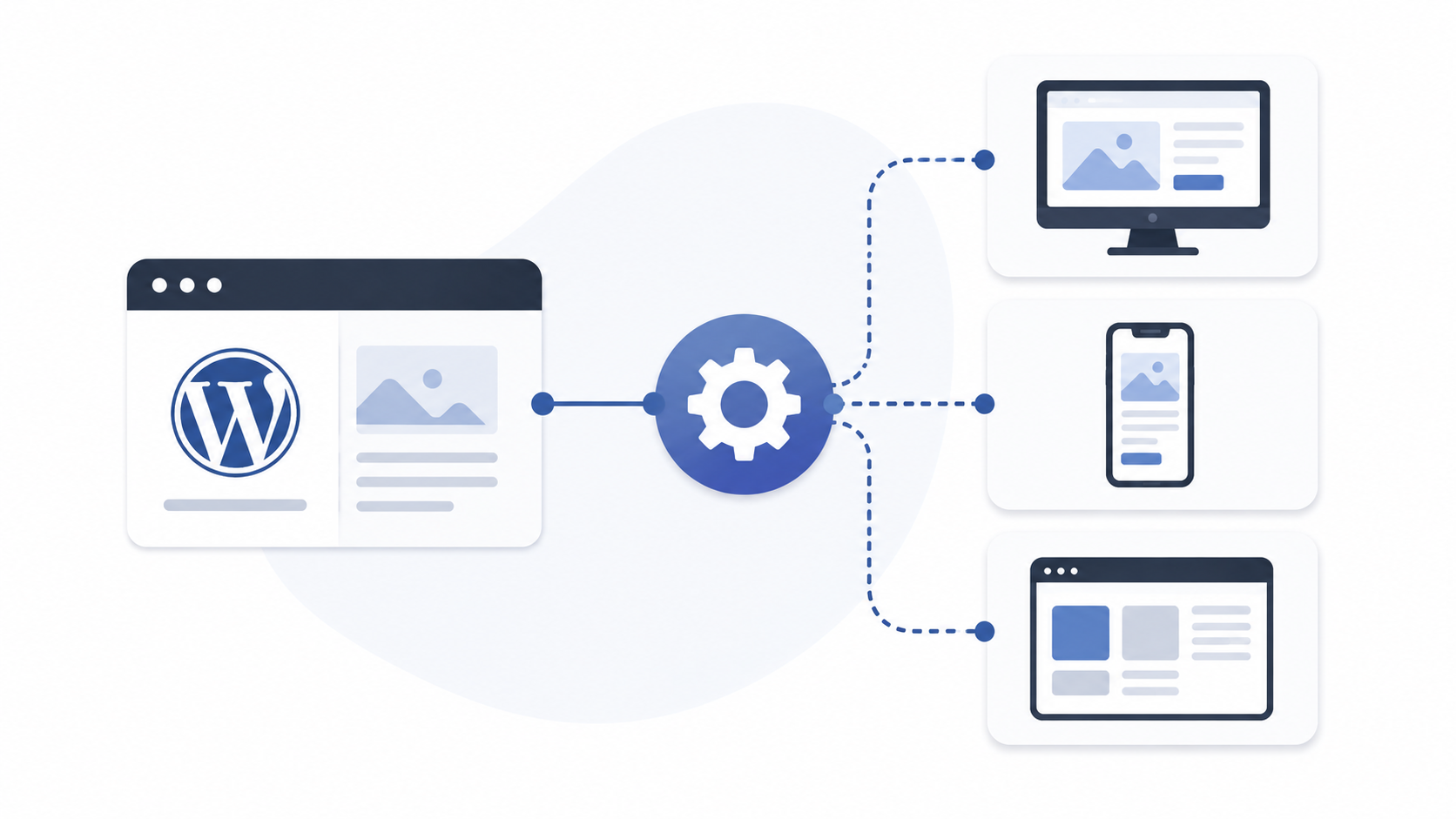
A headless CMS splits these two jobs apart. The system still stores and manages content, but it no longer controls how that content is shown. Instead, content moves through APIs, the technical channels two systems use to exchange data, to whatever front-end app needs it. That could be a website, a mobile app, a customer portal, a kiosk, or a digital display. The term “headless” simply means the CMS no longer includes the “head,” or presentation layer, at all.
This split matters more as organizations publish content across more than one channel. A university, for example, might need the same news and event content on its main site, a student mobile app, and digital signage in dormitories. Likewise, a retail brand’s marketing team might need one product description to reach the website, an email campaign, and a partner marketplace at once. Managing content once and sending it everywhere, instead of copying it by hand across separate systems, is the core appeal of going headless. It is also the main reason the model has drawn so much attention from developers and business leaders alike.

The advantages of going Headless
Given this architecture, headless platforms offer several concrete benefits, both technical and strategic.
Front-end flexibility: Because content is separate from presentation, developers are not boxed in by the built-in design system of a traditional CMS. Instead, they can build the front end with modern frameworks such as Next.js, React, Vue, or Angular. That means custom features and richer, more interactive experiences than standard templates usually allow. This matters most for organizations whose digital experience is itself a selling point.
Multi-channel content delivery: Since content lives apart from whatever displays it, the same content can go out across multiple channels at once: websites, mobile apps, internal tools, and partner platforms. This cuts duplicate work for content teams and keeps messaging consistent across every channel a customer might see. For organizations managing multiple brands or products, this is often the deciding factor.
Growth: Splitting content management from presentation also lets each part of the system scale on its own. Large organizations with high traffic and heavy content volumes often find this split means infrastructure can grow where it is actually needed. One busy component no longer slows down the entire system.
Future-proofing: A traditional CMS often ties content closely to a site’s design and underlying tech, so redesigning the site can mean rebuilding much of the back end too. With a headless CMS, content sits separately, which makes it easier to redesign or rebuild the front end without moving or recreating the content underneath. In theory, that makes it easier, and cheaper, to adapt as new devices and channels emerge, protecting the initial investment in content over time.
The trade-offs that often get overlooked
These benefits, however, come with real costs, and platform evaluations often underweight them.
Development complexity
A traditional CMS delivers most core website features out of the box, so it is quicker to set up and run. A headless CMS is more complex, since the team needs to build and maintain several separate pieces: the content system, the front-end site or app, the API connections between them, and the process for deploying updates. That makes the whole system more flexible, but also more demanding to run, and the extra work does not stop after launch.
Higher costs and longer timelines
Headless projects need custom front-end development on top of content management, so they typically come with bigger budgets and longer build times than a comparable traditional CMS project. For some businesses, that investment pays off in flexibility and speed down the line. For others, it just produces a website that does the same job a traditional CMS would have done, at a fraction of the cost.
More specialized maintenance
Maintenance does not disappear with a headless setup. It just becomes more specialized and technical. Keeping a headless site running well usually needs skills across CMS administration, front-end frameworks, API connections, hosting, and build pipelines. If you do not have a strong in-house tech team, or a dependable development partner, weigh this added complexity carefully before going headless. The skills gap tends to show up after launch, not during the sales pitch.
Less intuitive content editing
Traditional CMS platforms usually give editors a live preview of how content will look once published. In headless systems, writing and editing content is often separate from how it appears on the final site. This can make it harder for non-technical staff to picture changes, and it may feel less straightforward when creating or updating content. Modern headless platforms are improving here, but it remains a real gap for many editorial teams. It is worth testing before you sign off on a platform.

Choosing between Headless and Traditional: what actually matters
Rather than asking which architecture is objectively better, ask which one fits your organization’s actual needs and available resources.
Headless architecture tends to make sense if you have multiple digital channels, a mobile app alongside a website, highly customized front-end requirements, large-scale content operations, or the in-house development resources to support ongoing maintenance. Common examples include enterprise-wide digital ecosystems, software platforms with content components, large publishers, and multi-brand organizations. Ultimately, the headless decision is a version of the broader build vs buy question: whether the benefits of a custom frontend layer justify the additional development and maintenance cost compared to staying on a traditional platform.
Headless tends to make sense if you have multiple digital channels, a mobile app alongside a website, highly custom front-end needs, large-scale content operations, or the in-house development resources for ongoing upkeep. Common examples include enterprise-wide digital ecosystems, software platforms with content components, large publishers, and multi-brand organizations. At heart, the headless decision is a version of the broader build vs buy question: do the benefits of a custom frontend justify the added development and maintenance cost compared to staying on a traditional platform?
A traditional CMS remains the more practical choice if your main goal is running a website well, without the overhead of a separate front-end build. This is usually true for nonprofits, membership organizations, small and medium-sized businesses, professional associations, and most corporate or content-driven sites. These organizations tend to value easy content management, lower ongoing maintenance, faster launches, and cost savings over flexibility they may never fully use. It is worth noting that platforms such as WordPress still dominate the market for exactly this reason. They solve common organizational needs without requiring custom architecture, giving both marketing and IT teams a well-understood, low-risk starting point.
The Middle Ground: Hybrid and Headless WordPress
Between these two extremes, a common approach blends the two models. WordPress can run as a headless content source, using its built-in REST API or a plugin such as WPGraphQL to expose content, while a modern framework like Next.js or Faust.js handles the front end. In practice, editors keep working in the WordPress dashboard they already know, while developers get the flexibility of a modern, decoupled front end instead of being locked into WordPress themes and templates.
This setup suits organizations that want some of the speed and customization benefits of headless architecture without giving up the editorial workflows, plugin ecosystem, and institutional knowledge they have already built around WordPress. That said, it is not the right fit for every project. It adds an extra layer of API work compared to a standard WordPress install, and it still needs ongoing front-end development skills. Even so, if you are caught between “we need more flexibility” and “we do not want to rebuild everything,” it is often a sensible middle path, and a lower-risk way to test whether headless benefits justify a fuller migration later.
Frequently Asked Questions
- Is a headless CMS better than WordPress?
Not necessarily. They solve different problems. Organizations with complex, multi-channel needs may benefit from headless architecture, while many content-driven websites are well served by WordPress or another traditional CMS. - Is a headless CMS more expensive?
In most cases, yes. The added front-end development and infrastructure typically raise both initial and ongoing costs compared to a traditional CMS project of similar scope. - Does a headless CMS improve SEO?
Not automatically. Search performance depends on content quality, site structure, technical setup, accessibility, and page speed. Both traditional and headless platforms can reach strong SEO results when built correctly. - Is a headless CMS more secure?
It can reduce certain attack surfaces, since content management and presentation live apart. Overall security still depends on implementation quality, hosting, timely updates, and access controls, regardless of architecture. - Should you move to headless?
Not necessarily. A traditional CMS may give you better outcomes if it delivers the functionality you actually need with less complexity and lower cost.
Choosing the right architecture for your business
Conversations about headless CMS often turn polarized. Some treat it as the inevitable future of the web; others dismiss it as unnecessary complexity. In practice, neither extreme is right. The best architecture decision depends on organizational needs and available resources, not on technology trends.
To sum up, a headless CMS can be an excellent choice for organizations that need multiple digital channels, highly custom user experiences, or a complex content ecosystem, and that have the technical capacity to support it. For many other websites, though, a traditional CMS remains the more efficient, cost-effective, and manageable path forward.
At Web Experts Nepal, we help you evaluate technology choices based on practical requirements rather than industry buzzwords. Whether your project is best served by WordPress, a headless CMS, a hybrid architecture, or a fully custom build, our goal stays the same: helping you choose an approach that supports long-term growth and sustainable operations. The right platform is not the most fashionable one. It is the one that lets you do your work effectively.
Contact UsRelated resources.

How to Scale a WooCommerce Store Without Breaking Performance
React for MVP Development: Why It Is a Preferred Choice for Faster Product Building
Salesforce and WordPress Integration: Connecting Your Website and CRM Without Creating More Work
Have an idea worth building?
Share your concept with us and we’ll help you shape the right approach.